Most contractors do not wake up one day and randomly decide they need new software.
Usually, the search starts after an existing process has been under strain for a while. Maybe field information keeps reaching the office late, or maybe equipment updates are getting harder to trust. Whatever the specific issue looks like, software usually enters the conversation after the problem has already been slowing people down for some time.
That is why one of the biggest mistakes contractors can make is starting with the software.
It's easy to sit through demos, compare features, and get pulled into what each platform can do. The more important question is what your business actually needs fixed. That is the question contractors should answer before they buy, switch, or rebuild anything.
This article is adapted from a recent IVO Systems webinar, The Contractor’s Guide to Operations Software. You can also watch the full recording here if you prefer to hear the full discussion.
Construction operations software has to fit the field
I'm a construction guy first. My grandpa immigrated to America and started a small construction company. My dad took it over and ran it my entire life, so I grew up around the business. Later, I worked for a large heavy civil contractor here in Wisconsin, and looking back, they were very advanced when it came to technology. We had good people, good systems, and a real willingness to modernize.
But even after buying software, the paper did not disappear. The spreadsheets did not disappear. The phone calls, texts, and “does anybody know where this is?” conversations kept happening.
The company had made real investments in technology, but when it came to the daily movement of people, equipment, work, maintenance, and information, there were still gaps the software on the market did not handle very well.
That experience shaped how I think about construction operations software. A lot of systems in this industry were built around estimating, accounting, project management, or the back office. Those are important parts of the business, but they are different from field operations.
A foreman is not an estimator. A mechanic is not an accountant. An equipment manager is not trying to live inside an ERP all day just to figure out where a machine is, whether it needs service, or what job it is heading to next. That frustration is what eventually led me to build IVO Systems. I quit my job to build the software I wished I had when I was on the contractor side.
So this topic is not theoretical to me. I have seen how hard it is to evaluate software while you are also trying to run work, manage crews, keep equipment moving, and protect margins. And now, from the software side, I have also seen how contractors can get pushed toward tools that are bigger than what they need, too narrow to solve the real issue, or too disconnected from the people who actually have to use them.
Start with the problem, not the software
Most software searches start with a symptom. Maybe payroll is taking too long. Equipment information is hard to trust. Maintenance is too reactive. The schedule keeps changing, and everyone is tired of chasing updates. Those are real issues, but they are not always the underlying problem.
- Payroll taking too long may look like a payroll problem, but a lot of the time, it starts with how time, equipment, cost codes, job activity, and field notes are being captured before payroll ever sees them.
- Equipment being hard to track may look like a GPS problem, but it could also be a dispatch problem, a job setup problem, a responsibility problem, or a visibility problem across systems that do not talk to each other.
- Maintenance feeling reactive may look like a shop problem, but it may actually be tied to inspections, service history, equipment hours, or how maintenance needs are communicated between the field and the office.
That distinction matters because solving only the symptom can leave you spending time and money while the same underlying problems continue to show up.
A better starting point is to look for signs of repeated friction. If the team is constantly chasing information, entering the same data in multiple places, or relying on one person as the only source of truth for equipment, crews, and job activity, the process probably needs a closer look.
Keep in mind that software has limits. It can make a good process faster, cleaner, and more visible, but it usually cannot fix a process nobody has taken the time to define or manage.
The contractors who get the most value out of technology are usually the ones who take the time up front to understand what is actually broken, what is simply inconvenient, and what is costing real time and money.
Get specific about what you want to solve
A lot of companies will say things like, “We need better communication,” or “We need more visibility,” or “We want better data capture.”
Those phrases are understandable, but they are too broad to buy software against. Better visibility into what? Equipment locations? Crew schedules? Daily production? Maintenance needs? Timecard status? Equipment utilization? Project cost impacts? And once you have that information, how do you plan to use it?
The more specific you can get, the easier it becomes to compare options.
One way to do this is to look at the handoffs in your business. Construction operations are full of them, from the field and office connection to the shop and field connection, the equipment manager and project team, the scheduler and foreman, payroll and operations, and leadership and the people making daily decisions.
The biggest problems often show up in those transitions because that is where information gets delayed, changed, re-entered, misunderstood, or lost. Field information may have to be rebuilt by the office, equipment issues may stay in the shop until they affect a project, and leadership may be making decisions from information that is already old or hard to trust.
This exercise can feel like creating a list of complaints, but the goal is to identify which problems are frequent enough, expensive enough, or painful enough to justify a change.
A simple way to evaluate your current process
When contractors are trying to decide whether a process is working, I like to look at a few categories: visibility, accuracy, speed, standardization, accountability, and scalability.
Visibility asks whether the people who need information can actually see it without calling around. Accuracy asks whether the information is current enough and trusted enough to make decisions from it. Speed asks how long it takes information to move from the plan, to where the work happens, and back to the office where the next decisions are made.
Standardization looks at whether jobs, equipment, employees, divisions, cost codes, statuses, and other important operational details are being handled consistently. Accountability looks at whether there is a clear record of what happened, who changed something, when it changed, and why. Scalability looks at whether the process would still work if the company added more crews, more jobs, more equipment, or another region.
That last one is where the truth often comes out. What happens when the one person who knows everything is suddenly gone? If the process depends on “Johnny” remembering every machine, every job, every issue, and every workaround, that is key person risk.
A spreadsheet, whiteboard, phone-call chain, or one person who “just knows everything” may work for a while. But as the business grows, those processes start carrying more weight than they were built to handle. At some point, the issue is not that people are doing a bad job. The issue is that the process was never built to handle that much movement, change, and information. That is usually when software becomes worth evaluating.
Standardize before you scale
One of the most overlooked parts of software evaluation is standardization. Contractors often want to move fast, especially when they have already decided the old process is not working. That is understandable. But the setup work matters more than people sometimes think.
If equipment names are inconsistent, project names are inconsistent, cost codes are messy, statuses mean different things to different people, and no one has agreed on who should be allowed to change what, the software is going to inherit that confusion. Your setup becomes your system. A good system should be flexible enough to match the way your company operates, but flexibility does not remove the need for structure.
Before implementation, contractors should think through equipment and project names, user roles, permissions, company divisions, regions, equipment categories, statuses, cost codes, and who is responsible for entering, reviewing, and changing information.
Those details may feel small, but they determine whether the system feels natural or frustrating to use.
When the setup is clean, adoption becomes easier. People can find what they need, reports are more useful, the field sees what applies to them, and the office has more confidence in the data. The system becomes part of the daily process instead of another administrative burden. When the setup is messy, the opposite happens. People lose trust quickly, and once that happens, it is hard to recover.
So before you scale a process with technology, standardize the parts that need to be consistent.
Compare the types of operations software
After you understand the problem, then it makes sense to compare software options.
Most contractors are choosing between different types of systems with different strengths and tradeoffs. The main categories are legacy or all-in-one systems, point solutions, modular platforms, and internal or homegrown processes.
The right choice depends on what you are trying to solve, who needs to use the system, how quickly you need value, how much change your team can absorb, and what the software needs to connect with.
Legacy systems
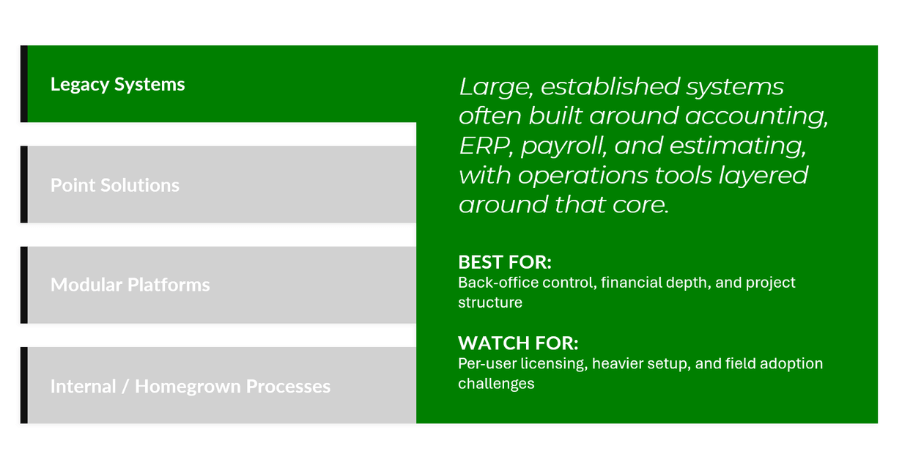
Legacy or all-in-one software suites can be powerful, especially when they are tied closely to accounting, ERP, payroll, estimating, or project controls. For certain contractors, that depth is important and valuable.
The tradeoff is that these systems are often built for the office first. That can make sense for financial control, but it can create friction when the same system is expected to support foremen, mechanics, equipment managers, dispatchers, and other operational users who need something easier to use and more practical.
A larger system may be the right fit if the primary problem is back-office control, accounting structure, or deep financial integration. But contractors should be realistic about field adoption, training, implementation effort, and whether the people closest to the work will actually use the system the way it was intended.
A system can be powerful while still being impractical for certain roles in the company.
Sometimes I look at certain systems and it seems like they are very good at capturing information. What happened? What did it cost? Where did the hours go? That information is important, but data capture alone does not make a company more efficient, productive, or profitable. Contractors should also ask how the software helps improve operations, not just track data better.
Point solutions
Point solutions are built to solve specific problems, and there are times when that is exactly what a contractor needs.
If the problem is narrow, well-defined, and mostly isolated from the rest of the business, a point solution can be a very good choice. It may be easier to implement, easier to train on, and faster to get value from.
The risk comes when the company starts solving every problem with a separate tool. One tool for time, one tool for equipment, one tool for inspections, one tool for maintenance, one tool for scheduling, one tool for telematics, and one tool for payroll may all be useful on their own. Together, they can still leave the contractor with disconnected information, duplicate entry, and more administrative work than expected.
That is where companies have to be careful. Buying a tool that solves one problem but creates three new handoffs may not actually be a win.

Modular platforms
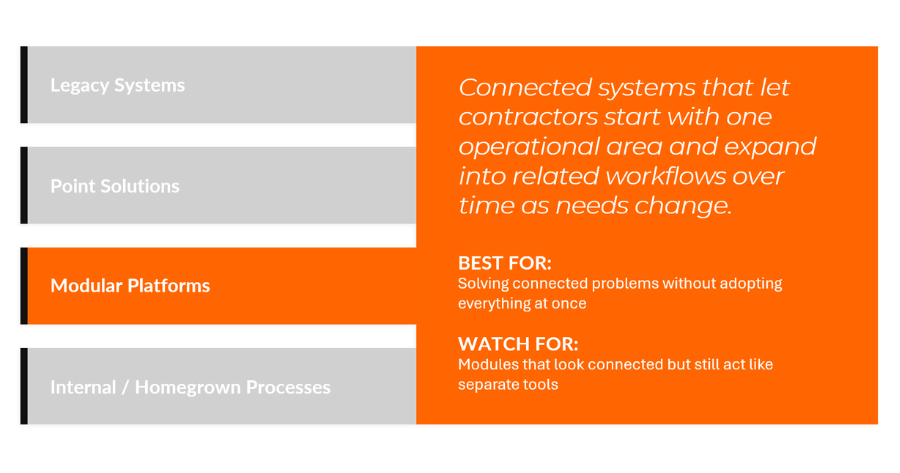
Modular platforms are designed to connect multiple areas of the operation while still letting contractors start in the areas that matter most.
That can be valuable because a lot of operational problems are related. Equipment tracking affects maintenance. Maintenance affects equipment availability. Inspections lead to work orders. Scheduling changes require communication across departments. Timecards affect payroll. Telematics affects equipment visibility. All of those areas are connected in the business, and when the information is connected too, it becomes more useful.
The benefit of a modular platform is that contractors can often start with the problem they care about most, then expand as the business is ready. That can help avoid over-buying because you do not have to adopt everything at once. It can also help avoid under-solving because the system can grow into related operational needs.
The caution is that a platform having a lot of modules does not automatically mean it solves your specific problem well. Contractors still need to evaluate the quality of the individual tools, how the data connects, and whether the system fits the people who will actually use it.
Several modules under one logo is different from one connected operating system.
I talked more about this shift toward modular software in a recent Under the Hard Hat article about why contractors are rethinking large, rigid systems and opting for more flexible platforms like IVO Systems.
Internal or homegrown processes
The last category is the internal, custom, or homegrown process. This could be spreadsheets, shared folders, paper forms, whiteboards, old internal databases, custom reports, custom-built software, or a process that someone inside the company has built and refined over years.
These processes often exist for a very good reason. In many cases, they were built around the company’s habits by people who understand the business, which is why they may still work better than a generic system in certain areas.
The risk is that they can become fragile. Spreadsheets are a good example. They are flexible, familiar, and easy to start with, which is why almost every contractor uses them somewhere. But over time, they can become hard to keep current, hard to use from the field, and hard to trust when multiple versions are floating around. One person updates a file, someone else saves a copy, another person is working from an old version, and suddenly nobody is completely sure which list is right.
They are also not always practical on a phone, which matters when the people closest to the work are not sitting at a desk.
Paper forms and whiteboards can run into the same kind of problem. They may work fine when everyone is in one place, but they get harder to manage when information needs to move between the field, shop, office, and leadership team quickly.
Custom software has its own version of that risk. You are not just paying to build it once. You are usually paying to maintain it, update it, troubleshoot it, and adjust it every time the business changes. If the developer disappears, gets busy, changes roles, or is the only person who understands how the system was built, the company can end up stuck with software it depends on but cannot easily change.
That does not mean you need to throw the whole process out. A good software implementation should start by understanding what the old process got right. But contractors should be honest about where that process is helping the business and where it has become a bottleneck.

Avoid over-buying and under-solving
This is where the idea of over-buying and under-solving comes in. Over-buying happens when a contractor buys more system than the team needs, more complexity than the process can support, or more features than the company is realistically going to use. Under-solving happens when a contractor buys something too narrow and never addresses the real operational problem. Both are expensive and time-consuming.
Over-buying wastes money, slows down implementation, and creates frustration when the system feels too big or too heavy for the team. Under-solving is frustrating because the company technically bought software, but the core problem still exists.
The right fit sits between those two extremes. It solves the real problem, fits the people who need to use it, and it gives the company a path to grow without forcing everything to change at once.
Look for a partner, not just a provider
The provider relationship matters more than contractors sometimes realize. A provider sells software. A partner helps you understand fit, implementation, adoption, and return.
That difference shows up during the sales process. If every question gets a quick “yes,” that is not always a good sign. Contractors should want a provider that is willing to say where the system is strong, where it is not the best fit, what implementation really takes, and what needs to happen on the contractor’s side for the rollout to work.
The demo is only part of the evaluation. A demo shows the product in a clean, controlled environment, while real life brings schedule changes, equipment moves, reshuffled crews, missed updates, and data coming from multiple systems. Field users do not have time to fight with software.
The better conversation goes beyond, “Can the system do this?”
Contractors should be asking whether the system will work for the way their team operates when the day is busy and things are changing. That is the level contractors need to evaluate.
A good evaluation should include questions that move the conversation away from a feature checklist and toward whether the software will actually work inside the business. What problems does the system solve best? What types of contractors are usually the best fit? How does implementation work? How will different roles use the system day to day? How do permissions and access work? How does the system connect with what you already use? Does it integrate with your accounting or ERP software, and to what level? What support happens after go-live? How does the provider help estimate ROI?
Those questions matter because operations software does not live in a vacuum. Accounting and ERP systems are critical to the business, and contractors need to understand how operational information will connect back to the systems they already depend on. The right provider should help you avoid a bad fit, even when that means recommending a smaller starting point, addressing a process issue before implementation, or being honest that another option may better fit the immediate problem.
Think about cost through return
Of course cost matters, but the better question is: what is the current process already costing you? Labor, equipment downtime, payroll cleanup, unnecessary rentals, rework, and managers spending hours chasing information all carry real costs. The current process already has a cost, even when that cost does not show up as a software invoice.
That is the shift contractors need to make when they evaluate technology. The cost conversation should include the process they already have: the time being lost, the rework being created, the equipment sitting idle, and the information people are chasing every day.
If software helps reduce administrative time, improve equipment utilization, avoid missed maintenance, cut down duplicate entry, speed up payroll, or give managers better information sooner, the return can easily outweigh the subscription cost. But that return should not stay vague. A provider should be able to connect the software back to time, cost, productivity, or risk reduction.
The real ROI comes from doing more with what you have. Becoming more efficient, not just capturing better data.
A simple example: if you have 100 field employees and your company is generating roughly $30 million in annual revenue, even a small efficiency gain can be meaningful. A half-percent improvement can add around $160,000 to the bottom line. That does not require software to completely transform the business overnight. It just has to help people and equipment operate a little more efficiently.
If a software company is asking you to invest money, they should be able to help you understand where the return may come from. That does not mean every number will be perfect. ROI depends on company size, current process, number of users, number of machines, implementation, and how consistently people use the system. But a provider should still be able to walk through the logic.
A final framework for choosing operations software
A good software decision starts with the business problem, not the feature list. Before you compare platforms, understand where the current process is costing time, money, accuracy, or accountability, whether the problem is isolated or connected to other parts of the operation, and what type of system fits the problem better than a long feature list alone.
You should also know what needs to be standardized before implementation, who needs to use the system day to day, how the provider will support adoption, and what return the business should expect.
The best software decision is not always the biggest system, and it is not always the cheapest tool. It is the system that solves the right problem at the right level, with a provider that understands how the work actually happens.
A simple framework is to start by identifying the operational problem that is actually worth solving. Then look at the current process and where it is costing the business. Compare the type of software that fits the problem now and the problems you may want to solve later. Evaluate whether the provider is acting like a partner or just selling a product. Make sure implementation includes standardization, not just setup. Think honestly about adoption, especially for the people closest to the work. And ask for a clear ROI conversation before you make the investment.
Not every contractor needs more software. But when a contractor decides to evaluate software, switch providers, or finally replace an old manual process, the decision should start with a clear understanding of the problem, the people involved, the process that needs to change, and the return the business expects.
That is how you avoid spending money on a system your team works around instead of works in.
See how IVO Systems can help
IVO Systems is a modular operations platform built for heavy civil contractors that need a practical way to manage equipment, people, maintenance, scheduling, timecards, dispatch, telematics, and field information.
Because IVO is modular, contractors can start with the area that matters most to their business, then expand into other connected workflows when they are ready. That means you do not have to adopt everything at once, but you still have a path toward bringing more of your field operations into one system.
If you are evaluating construction operations software and want to understand what would actually fit your process, schedule a test drive of IVO Systems.